Trouble uploading photos

Cbrugs

Administrator
Community Veteran
Joined
Dec 9, 2016
Messages
5,706
Reaction score
1,683
Location
Seattle, WA
Country
United States
Bulldog(s) Names
King Louie, Jax (French Bulldog), Ella Mae and Darla Rae
Out of nowhere I am having trouble uploading photos (on the FBN site as well). I go to insert image and click "from computer." And then instantly the "ok" button disappears and I can't even choose multiple photos. I was able to post pictures before so not sure what is going on.
 
Out of nowhere I am having trouble uploading photos (on the FBN site as well). I go to insert image and click "from computer." And then instantly the "ok" button disappears and I can't even choose multiple photos. I was able to post pictures before so not sure what is going on.

Hi! Are you doing from laptop? PC? Once you select the photo "from computer" you should see "upload file" button....
 
Hi! Are you doing from laptop? PC? Once you select the photo "from computer" you should see "upload file" button....

From a PC. The problem is it is not letting me choose multiple photos and the "ok" button is gone. So I can choose a photo but I can't actually upload it. I never had this issue before.
 
From a PC. The problem is it is not letting me choose multiple photos and the "ok" button is gone. So I can choose a photo but I can't actually upload it. I never had this issue before.

Can you upload just 1 ?
 
I tagged the technicians.
 
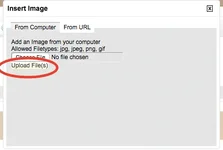
Are you not seeing the button in this screengrab? It can be a little hard to notice, but there's a button there..

Screen Shot 2017-04-05 at 11.09.32 PM.webp
 
Are you not seeing the button in this screengrab? It can be a little hard to notice, but there's a button there..

View attachment 105097

So I am in Firefox now so that I can upload pictures and show you what it looks like. This is NOT what it looks like with Chrome or IE.

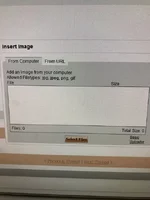
When I click "insert image" this is the first screen that pops up:

Before.webp

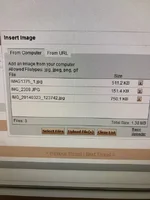
So I upload a file and then I get this:

After.webp

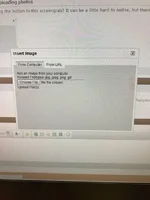
In Chrome and IE, this is what I get when I click "insert image"

Chrome.webp

This is all a recent issue as I never have had problems uploading pictures before.
 

Create an account or login to comment

You must be a member in order to leave a comment

Create account

Create an account on our community. It's easy!

Log in

Already have an account? Log in here.

Back
Top