
Casper
Well-known member
- Apr 28, 2013
- 1,716
- 215
- Country
- USA
- Bulldog(s) Names
- "The Stallone Bros"
1. Pick the Forum (subject that best fits your topic) you want to start your thread (post)
2. Either "Start Thread", "Reply", "Quick Reply" should bring up a box to start your thread and this box...... Look for the icon in the below picture.

3. After clicking this icon a new box will appear......... Insert Image, "Select Files" should bring up a Menu on your computer, which you will be able to access your photo's on your computer, laptop, iPad, iPhone, Droid etc..... "Select the File" and upload!
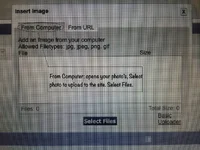
Hope this helps........ Happy New Year!!
2. Either "Start Thread", "Reply", "Quick Reply" should bring up a box to start your thread and this box...... Look for the icon in the below picture.
3. After clicking this icon a new box will appear......... Insert Image, "Select Files" should bring up a Menu on your computer, which you will be able to access your photo's on your computer, laptop, iPad, iPhone, Droid etc..... "Select the File" and upload!
Hope this helps........
Happy New Year!!


